

Kubernetes Cost Optimization: Requests, Autoscaling, Nodes
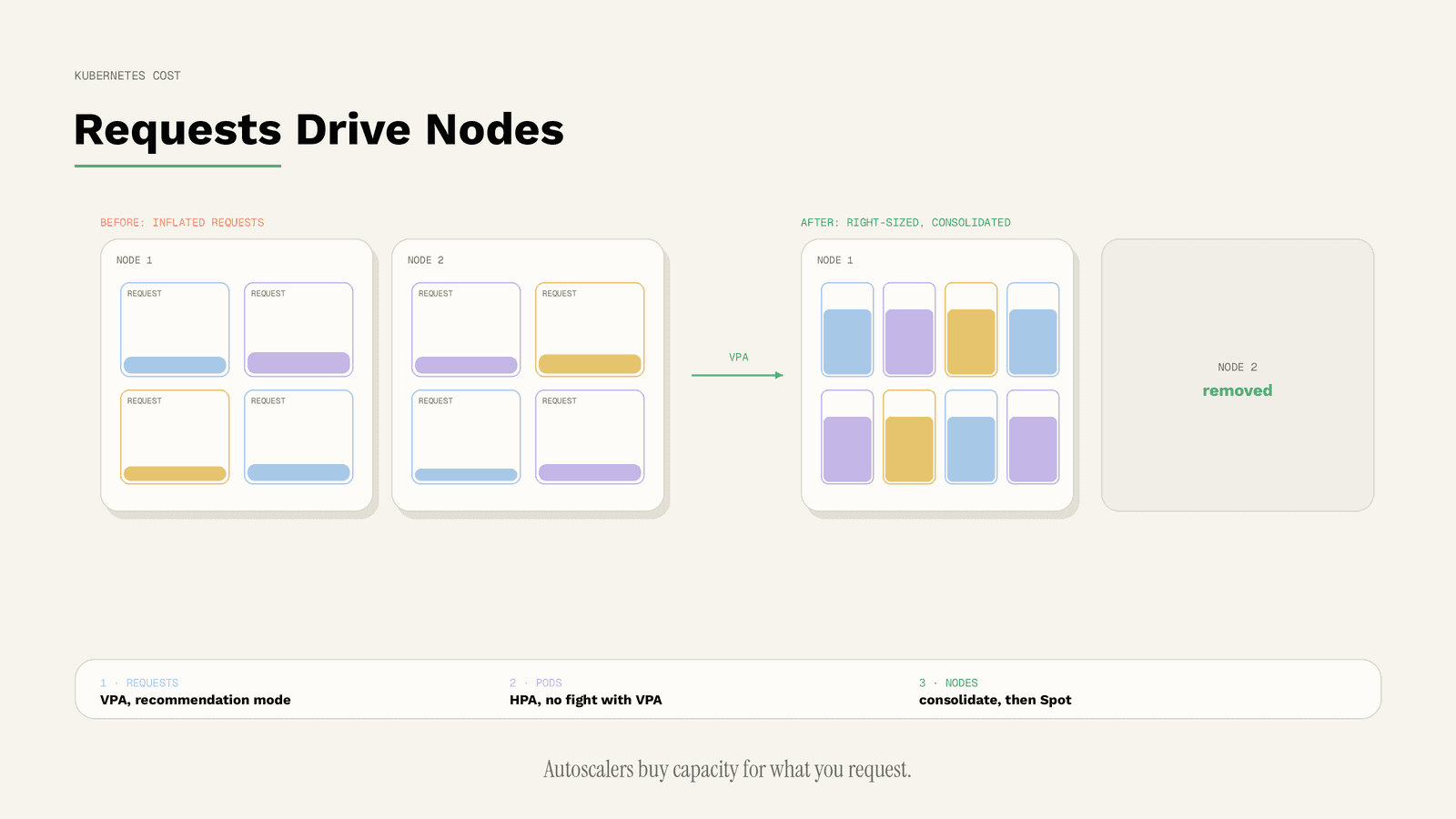
WHY REQUESTS DRIVE YOUR BILL
When you set a resource request for a container, the kube-scheduler uses it to decide which node the pod goes on, and the kubelet reserves at least that amount for the container. A limit works differently: the kubelet enforces it so the container cannot use more than the limit. For CPU the limit is a hard ceiling enforced by throttling. For memory, the limit is enforced reactively by the kernel through out-of-memory kills when there is memory pressure [W1].
The cost consequence is spelled out in the Kubernetes node autoscaling documentation. Node autoscalers make sure new nodes have enough resources to satisfy pod requests, but they do not directly take into account the real resource usage of pods after they start running. The documentation states that correctly setting pod resource requests is as important to a cluster's cost-effectiveness as optimizing node utilization [W4].
In other words, a pod that requests four CPUs and uses one still pays, through the node it occupies, for four.
STEP 1: RIGHT-SIZE REQUESTS WITH THE VERTICAL POD AUTOSCALER
The Vertical Pod Autoscaler (VPA) adjusts resource requests and limits of a workload to match actual usage. Unlike the Horizontal Pod Autoscaler, it is not part of the core Kubernetes API and must be installed separately, and it needs a metrics source such as Metrics Server [W3].
GKE's cost guidance describes three VPA modes [W7]:
- Off, also called recommendation mode: VPA calculates recommendations but changes nothing. This is the safe starting point.
- Initial: VPA sets requests only when a pod is created.
- Auto: VPA updates CPU and memory requests during the life of a pod, which can mean restarting pods.
A practical path is to run VPA in Off mode for a representative period, review the recommendations against known peaks, and only then apply them. For the general theory of matching capacity to demand, see Rightsizing and Autoscaling in Multi-Cloud.
STEP 2: SCALE PODS HORIZONTALLY
The Horizontal Pod Autoscaler (HPA) updates a workload such as a Deployment to add pods when load rises and remove them when it falls, down to the configured minimum. It runs as a control loop, by default every 15 seconds, comparing utilization against the metrics in each HPA definition [W2].
HPA saves money only if its target is sensible. GKE's guidance offers a simple formula for a CPU target that keeps a buffer for traffic growth during scale-up: (1 minus buffer) divided by (1 plus expected growth) [W7]. A target that is too low keeps too many pods running; a target that is too high risks latency spikes before new pods are ready.
Do not let HPA and VPA fight
GKE's official recommendation is not to combine VPA and HPA on the same CPU or memory metric, because the two would react to the same signal in opposite ways. The guidance lists exceptions, for example when VPA runs in recommendation mode or when HPA scales on custom metrics [W7]. Running VPA in Off mode next to an HPA is therefore a safe way to learn right sizes without conflict.
STEP 3: AUTOSCALE AND CONSOLIDATE NODES
Pod-level savings only reach the bill when nodes shrink too. Node autoscalers provision new nodes for pods that cannot be scheduled and consolidate nodes that are no longer well used, by removing or replacing them. Cluster Autoscaler and Karpenter are the two node autoscalers currently sponsored by the Kubernetes SIG Autoscaling, and both provision and consolidate [W4].
Because node autoscalers act on requests, Step 1 directly improves Step 3: right-sized requests let consolidation pack pods onto fewer nodes. GKE adds that requests must still be large enough for pods to run normally, or nodes may end up too small and pods can crash [W7].
STEP 4: USE CHEAPER CAPACITY WHERE WORKLOADS ALLOW IT
Once the cluster is sized correctly, the pricing model matters. Amazon's EKS best practices group cost optimization into cost-effective resources, expenditure awareness and optimizing over time, and recommend Savings Plans (previously Reserved Instances) for predictable workloads alongside Spot Instances [W6]. GKE notes that if a workload can tolerate capacity losses, node pools built on Spot VMs save more money [W7].
The rule is the same on both platforms: commit only to the stable baseline, and run interruption-tolerant work such as batch jobs or stateless workers on Spot capacity. Our article Commitment Strategy: On-Demand, Reserved, Spot treats this as a portfolio decision.
STEP 5: PUT GUARDRAILS ON NAMESPACES
Optimization decays without limits. A ResourceQuota constrains aggregate resource consumption per namespace, and a LimitRange can apply default requests to pods that do not declare any, so teams do not forget [W5]. Default requests are particularly valuable: a pod without requests is invisible to the scheduler's cost logic until it causes contention.
Quotas also make cost ownership visible. When each team has a namespace with a quota, the question "who uses this capacity?" has an answer. For attribution and anomaly detection beyond Kubernetes, see Where Multi-Cloud Spend Leaks.
THE ORDER AT A GLANCE
| Step | Mechanism | What it changes | Main risk |
|---|---|---|---|
| 1 | VPA (Off, then Initial or Auto) [W3][W7] | Pod requests and limits | Restarts in Auto mode; missed peaks |
| 2 | HPA [W2][W7] | Number of pods | Wrong target; conflict with VPA on same metric |
| 3 | Node autoscaling and consolidation [W4] | Number and shape of nodes | Requests set too low |
| 4 | Savings Plans and Spot [W6][W7] | Price per node hour | Over-commitment; interruption |
| 5 | ResourceQuota and LimitRange [W5] | Team boundaries and defaults | Quotas set without data |
COMMON MISTAKES
Optimizing nodes before requests. Node autoscalers follow requests, so oversized requests survive any node optimization [W4].
Setting memory limits below real peak usage. Memory limits are enforced through out-of-memory kills, which turns a cost saving into an outage [W1].
Running VPA in Auto mode on critical services without disruption budgets. Auto mode can restart pods; GKE recommends Pod Disruption Budgets to control how many pods are taken down at once [W7].
Treating Spot as free capacity. Spot capacity can be reclaimed, so it belongs to workloads designed for interruption [W7].
LIMITATIONS
This guide is based on the Kubernetes project documentation and on GKE and EKS guidance as of 15 October 2026. Behaviour differs between managed Kubernetes services and versions, and features such as in-place resizing continue to evolve. No savings figures are given, because they depend entirely on how far current requests are from real usage, which only your own metrics can show.
CONCLUSION
Kubernetes cost optimization is mostly a requests problem with an autoscaling solution. Get requests right, let HPA and node autoscalers do their work without conflicting, and put cheaper capacity under the workloads that can take it.
Atomity applies this across clusters and clouds. It detects over-provisioned and idle Kubernetes resources, proposes right-sized requests, and turns findings into draft pull requests, Jira tickets and Slack alerts so your engineers stay in control of every change. To see where your clusters are over-provisioned, start with a free cloud cost check.
SOURCES
- [W1] Kubernetes Documentation: Resource Management for Pods and Containers. https://kubernetes.io/docs/concepts/configuration/manage-resources-containers/ (accessed 15 October 2026)
- [W2] Kubernetes Documentation: Horizontal Pod Autoscaling. https://kubernetes.io/docs/concepts/workloads/autoscaling/horizontal-pod-autoscale/ (accessed 15 October 2026)
- [W3] Kubernetes Documentation: Vertical Pod Autoscaling. https://kubernetes.io/docs/concepts/workloads/autoscaling/vertical-pod-autoscale/ (accessed 15 October 2026)
- [W4] Kubernetes Documentation: Node Autoscaling. https://kubernetes.io/docs/concepts/cluster-administration/node-autoscaling/ (accessed 15 October 2026)
- [W5] Kubernetes Documentation: Resource Quotas. https://kubernetes.io/docs/concepts/policy/resource-quotas/ (accessed 15 October 2026)
- [W6] Amazon EKS Best Practices Guide: Best Practices for Cost Optimization. https://docs.aws.amazon.com/eks/latest/best-practices/cost-opt.html (accessed 15 October 2026)
- [W7] Google Cloud: Best practices for running cost-optimized Kubernetes applications on GKE. https://docs.cloud.google.com/architecture/best-practices-for-running-cost-effective-kubernetes-applications-on-gke (accessed 15 October 2026)
/ GET STARTED
Make Sovereign Cloud Decisions with Confidence
Turn sovereignty requirements into enforceable cloud decisions, with continuous visibility and evidence across providers.