

Azure Cost Optimization: A Practical Enterprise Guide
THE FRAMEWORK: USAGE FIRST, RATES SECOND
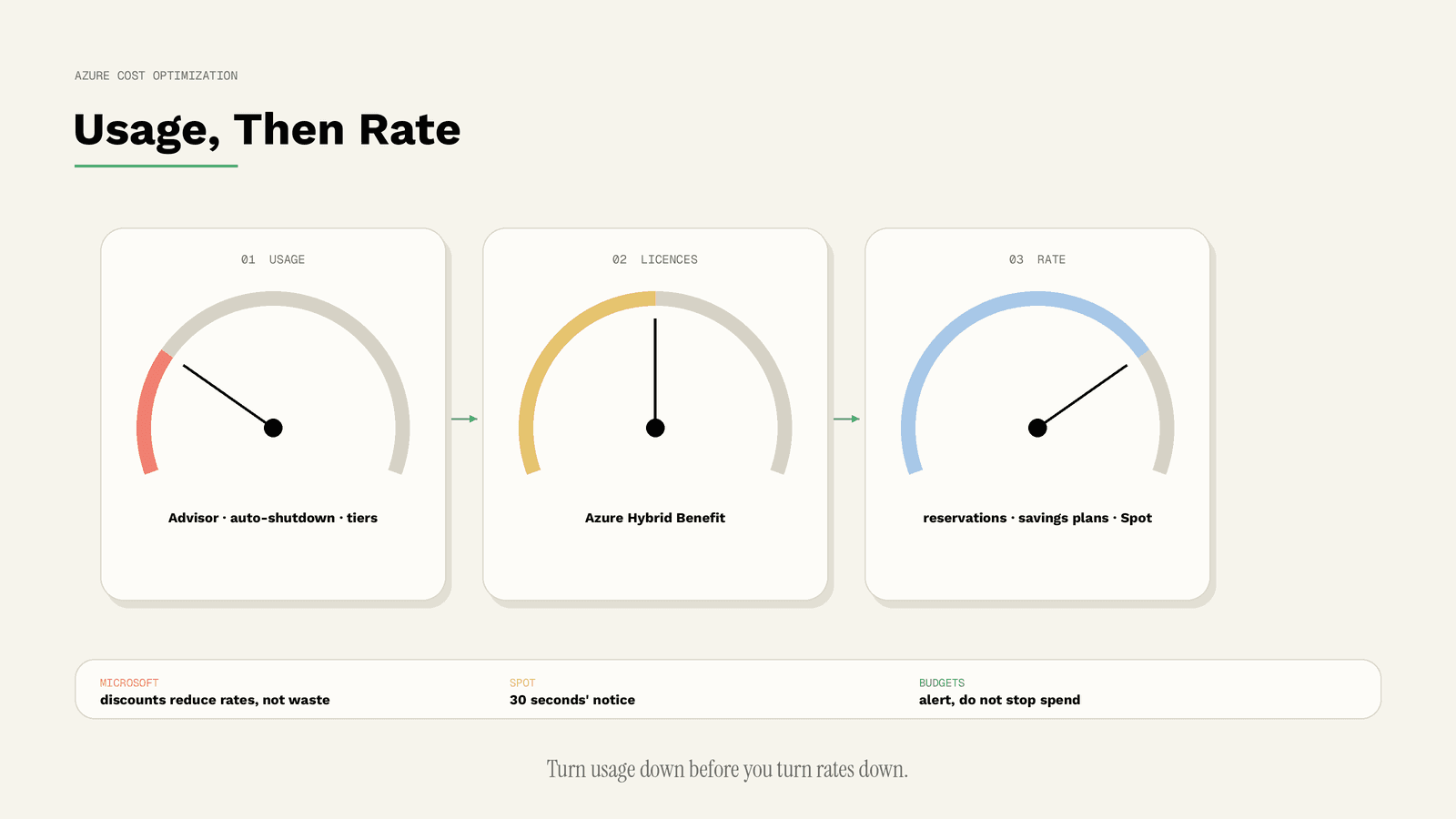
The Azure Well-Architected Framework structures cost optimization into five principles: develop cost-management discipline, design with a cost-efficiency mindset, design for usage optimization, design for rate optimization, and monitor and optimize over time [W1]. The distinction between usage and rate is the practical key. Usage optimization means running fewer or smaller resources. Rate optimization means paying less for the same resources without redesign, through commitments, licence benefits or negotiated terms [W1]. Usage comes first, because a rate discount on a resource you do not need is still waste.
STEP 1: MAKE COSTS VISIBLE AND OWNED
Tags are key-value metadata you apply to Azure resources, for example an environment or cost-centre key. Microsoft notes that resource tags support all cost-accruing services and recommends tag policies to ensure costs are provisioned with a tag. It also warns that tags are stored as plain text and should never contain sensitive values, because they can surface in cost reports [W8].
With tags in place, cost analysis can be broken down by team and workload, which is the basis for every later decision. How organisations move from this visibility to continuous optimization is the subject of our article on FinOps maturity.
STEP 2: REMOVE IDLE AND UNDERUSED RESOURCES
Azure Advisor helps reduce overall spend by identifying idle and underutilized resources, with recommendations on the Cost tab of the Advisor dashboard [W2]. Some recommendations are based on short observation windows; for App Service plans, for example, Advisor analyzes usage patterns over the past seven days to identify low CPU usage [W2]. Microsoft itself notes that low utilization can be intended in some scenarios [W2], so each recommendation still needs an owner's confirmation.
For virtual machines that are only needed during working hours, the auto-shutdown feature shuts VMs down during off hours to reduce cost [W9]. Development environments are the obvious first candidates.
STEP 3: USE THE LICENCES YOU ALREADY PAY FOR
Azure Hybrid Benefit lets organisations apply existing on-premises licences with Microsoft Software Assurance, and active Linux subscriptions, to Azure. Microsoft states savings of up to 76 percent versus pay-as-you-go for Linux with Hybrid Benefit, and an average of 29 percent for SQL Server compared with leading cloud providers. It also grants 180 days of migration time for Windows Server and SQL Server, during which licences can be used on-premises and in Azure [W4]. These are Microsoft's own figures and maximums, but the mechanism is real: if you already own eligible licences, not applying them means paying twice.
STEP 4: COMMIT TO DISCOUNTS IN THE RIGHT ORDER
Azure offers two ways to save by committing for one or three years [W3]:
- A reservation commits you to a specific instance type or family in a specific region, for example a particular VM size in one region for a year. Microsoft recommends reservations for workloads that run continuously and are highly stable, and notes that fully used reservations give the greatest savings.
- A savings plan commits you to a fixed hourly spend on eligible compute services across all regions. Microsoft recommends savings plans for dynamic or evolving workloads that use various instance families or regions.
Microsoft also documents the sequence to limit wasted commitments [W3]:
1. Right-size first, because discounts reduce rates, not waste. 2. Exchange underutilized reservations for better-fitting configurations. 3. Trade in underutilized reservations for savings plans when usage has become variable. 4. Buy new reservations only for stable, well-understood workloads. 5. Add new savings plans last, sized to a clean, optimized baseline.
That order is the most useful single rule in Azure rate optimization. For how to size the committed baseline as a portfolio across providers, see Commitment Strategy: On-Demand, Reserved, Spot.
STEP 5: RUN INTERRUPTIBLE WORK ON SPOT VMS
Azure Spot Virtual Machines use unused Azure capacity at significant savings. The trade-off is clear in Microsoft's documentation: Azure can evict Spot VMs at any time it needs the capacity back, with 30 seconds' notice, there is no SLA, and VMs can also be stopped when the price exceeds the maximum you set [W5]. Microsoft names batch processing, dev/test and large compute workloads as good fits [W5]. Anything that cannot be restarted cleanly within 30 seconds does not belong there.
STEP 6: PUT STORAGE IN THE RIGHT TIER
Azure Blob Storage offers access tiers with different cost profiles. The hot tier has the highest storage cost and the lowest access cost. The cool tier is for infrequently accessed data with a recommended minimum of 30 days, the cold tier for rarely accessed data with a minimum of 90 days, and the archive tier is an offline tier for data that can tolerate retrieval latency of hours, with a minimum of 180 days [W10]. Microsoft also describes a smart tier that moves data between tiers automatically [W10].
The minimum durations matter: moving data out of a tier early can cost more than it saves, so tiering decisions should follow real access patterns.
STEP 7: LOWER RATES FOR NON-PRODUCTION
Azure Dev/Test pricing offers discounted rates on Azure services for ongoing development and test workloads, available to active Visual Studio subscribers [W11]. If your developers already hold eligible subscriptions, running dev/test environments under the right offer is a rate optimization that requires no technical change.
STEP 8: GUARDRAILS THAT KEEP SAVINGS IN PLACE
Budgets in Cost Management let you set alerts on actual or forecast cost and trigger an action group when a threshold is reached. Microsoft is explicit that budgets do not stop consumption or affect resources by themselves [W6]. Anomaly detection in Cost Analysis identifies atypical usage patterns based on cost and usage trends, and anomaly alerts notify you automatically [W7]. Together they catch drift early; without them, every optimization above slowly reverses. Our article Where Multi-Cloud Spend Leaks explains attribution and anomaly detection across providers.
THE SEQUENCE AT A GLANCE
| Step | Lever | Type | Main risk | Source |
|---|---|---|---|---|
| 1 | Tags and cost analysis | Visibility | Inconsistent tagging | [W8] |
| 2 | Advisor, auto-shutdown | Usage | Removing something still needed | [W2][W9] |
| 3 | Azure Hybrid Benefit | Rate | Eligibility and licence compliance | [W4] |
| 4 | Reservations and savings plans | Rate | Over-commitment | [W3] |
| 5 | Spot VMs | Rate | Eviction with 30 seconds' notice | [W5] |
| 6 | Blob access tiers | Usage and rate | Early-deletion minimums | [W10] |
| 7 | Dev/Test pricing | Rate | Eligibility | [W11] |
| 8 | Budgets and anomaly alerts | Guardrail | Alerts do not stop spend | [W6][W7] |
LIMITATIONS
This guide is based on Microsoft documentation as of 15 October 2026. Percentages such as "up to 76 percent" and "29 percent on average" are Microsoft's own statements and represent maximums or averages under Microsoft's assumptions, not expected results. Licence eligibility depends on your agreements. Actual savings can only be calculated from your own billing data.
CONCLUSION
Azure cost optimization rewards discipline more than discovery: make costs visible, remove waste, apply existing licences, then commit in Microsoft's recommended order and protect the result with budgets and alerts. Azure's native tools cover Azure; they do not tell you whether a workload would be cheaper elsewhere.
Atomity adds that view. It finds idle and oversized resources, compares whether a workload would run more cost-effectively on AWS, Google Cloud or a European cloud such as IONOS or STACKIT, and turns findings into draft pull requests, Jira tickets and Slack alerts so your engineers stay in control. To see where your Azure spend can drop, start with a free cloud cost check.
SOURCES
- [W1] Microsoft Learn: Azure Well-Architected Framework, Cost Optimization design principles. https://learn.microsoft.com/en-us/azure/well-architected/cost-optimization/principles (accessed 15 October 2026)
- [W2] Microsoft Learn: Cost recommendations, Azure Advisor. https://learn.microsoft.com/en-us/azure/advisor/advisor-reference-cost-recommendations (accessed 15 October 2026)
- [W3] Microsoft Learn: Decide between a savings plan and a reservation. https://learn.microsoft.com/en-us/azure/cost-management-billing/savings-plan/decide-between-savings-plan-reservation (accessed 15 October 2026)
- [W4] Microsoft Azure: Azure Hybrid Benefit. https://azure.microsoft.com/en-us/pricing/offers/hybrid-benefit (accessed 15 October 2026)
- [W5] Microsoft Learn: Azure Spot Virtual Machines. https://learn.microsoft.com/en-us/azure/virtual-machines/spot-vms (accessed 15 October 2026)
- [W6] Microsoft Learn: Tutorial, Create and manage budgets. https://learn.microsoft.com/en-us/azure/cost-management-billing/costs/tutorial-acm-create-budgets (accessed 15 October 2026)
- [W7] Microsoft Learn: Identify anomalies and unexpected changes in cost. https://learn.microsoft.com/en-us/azure/cost-management-billing/understand/analyze-unexpected-charges (accessed 15 October 2026)
- [W8] Microsoft Learn: Use tags to organize your Azure resources and management hierarchy. https://learn.microsoft.com/en-us/azure/azure-resource-manager/management/tag-resources (accessed 15 October 2026)
- [W9] Microsoft Learn: Auto-shutdown a virtual machine. https://learn.microsoft.com/en-us/azure/virtual-machines/auto-shutdown-vm (accessed 15 October 2026)
- [W10] Microsoft Learn: Access tiers for blob data. https://learn.microsoft.com/en-us/azure/storage/blobs/access-tiers-overview (accessed 15 October 2026)
- [W11] Microsoft Azure: Azure Dev/Test pricing. https://azure.microsoft.com/en-us/pricing/offers/dev-test/ (accessed 15 October 2026)
/ GET STARTED
Make Sovereign Cloud Decisions with Confidence
Turn sovereignty requirements into enforceable cloud decisions, with continuous visibility and evidence across providers.