

AWS Cost Optimization: An Enterprise Playbook
STEP 1: MAKE SPENDING ATTRIBUTABLE
AWS's Well-Architected cost optimization pillar lists five design principles: implement cloud financial management, adopt a consumption model, measure overall efficiency, stop spending money on undifferentiated heavy lifting, and analyze and attribute expenditure [W1]. The last one is the foundation. The cloud makes it possible to identify the cost and usage of each workload and attribute it to revenue streams and workload owners, which in turn gives owners a reason to optimize [W1].
In practice this means consistent tagging and an owner for every account and workload before any optimization round. Without attribution, savings are hard to prove and easy to lose. Our article on FinOps maturity describes how organisations move from visibility to continuous optimization.
STEP 2: STOP PAYING FOR IDLE TIME
AWS illustrates the consumption principle with a simple example: development and test environments are typically used about eight hours a day during the working week, so stopping them outside those hours can cut their cost by about 75 percent, 40 hours instead of 168 [W1]. That figure is AWS's own illustration, not a guarantee, but it shows why schedules for non-production environments are usually the first quick win.
The second source of idle cost is resources that nobody uses at all. AWS Compute Optimizer identifies idle resources alongside its rightsizing recommendations [W4].
STEP 3: RIGHT-SIZE WITH COMPUTE OPTIMIZER
AWS Compute Optimizer analyzes the configuration and utilization metrics of your resources and reports whether they are optimal, with recommendations to reduce cost and improve performance [W4]. It covers, among others, EC2 instances and Auto Scaling groups, EBS volumes, Lambda functions, ECS services on Fargate, Aurora and RDS databases, NAT Gateways and DynamoDB [W4].
Two details matter for enterprise use. First, by default Compute Optimizer analyzes the last 14 days of CloudWatch metrics; a paid feature, enhanced infrastructure metrics, extends this to 93 days [W4]. Fourteen days will miss monthly or quarterly peaks, so business-critical systems with seasonal load deserve the longer window or a manual review. Second, recommendations can be viewed across multiple accounts when you opt in through the organization's management account [W4], which is how central platform teams should run it.
For the design principles behind matching capacity to demand, see Rightsizing and Autoscaling in Multi-Cloud.
STEP 4: COMMIT WITH SAVINGS PLANS, AFTER RIGHTSIZING
Savings Plans offer lower prices than on-demand in exchange for committing to a specified amount of compute spend per hour for one or three years. AWS states savings of up to 72 percent on compute workloads [W2]. Compute Savings Plans are the most flexible variant: the discount applies to EC2 usage regardless of instance family, size, operating system, tenancy or region, and also to Fargate and Lambda. Payment can be all upfront, partial upfront or no upfront, and AWS Cost Explorer provides commitment recommendations [W2].
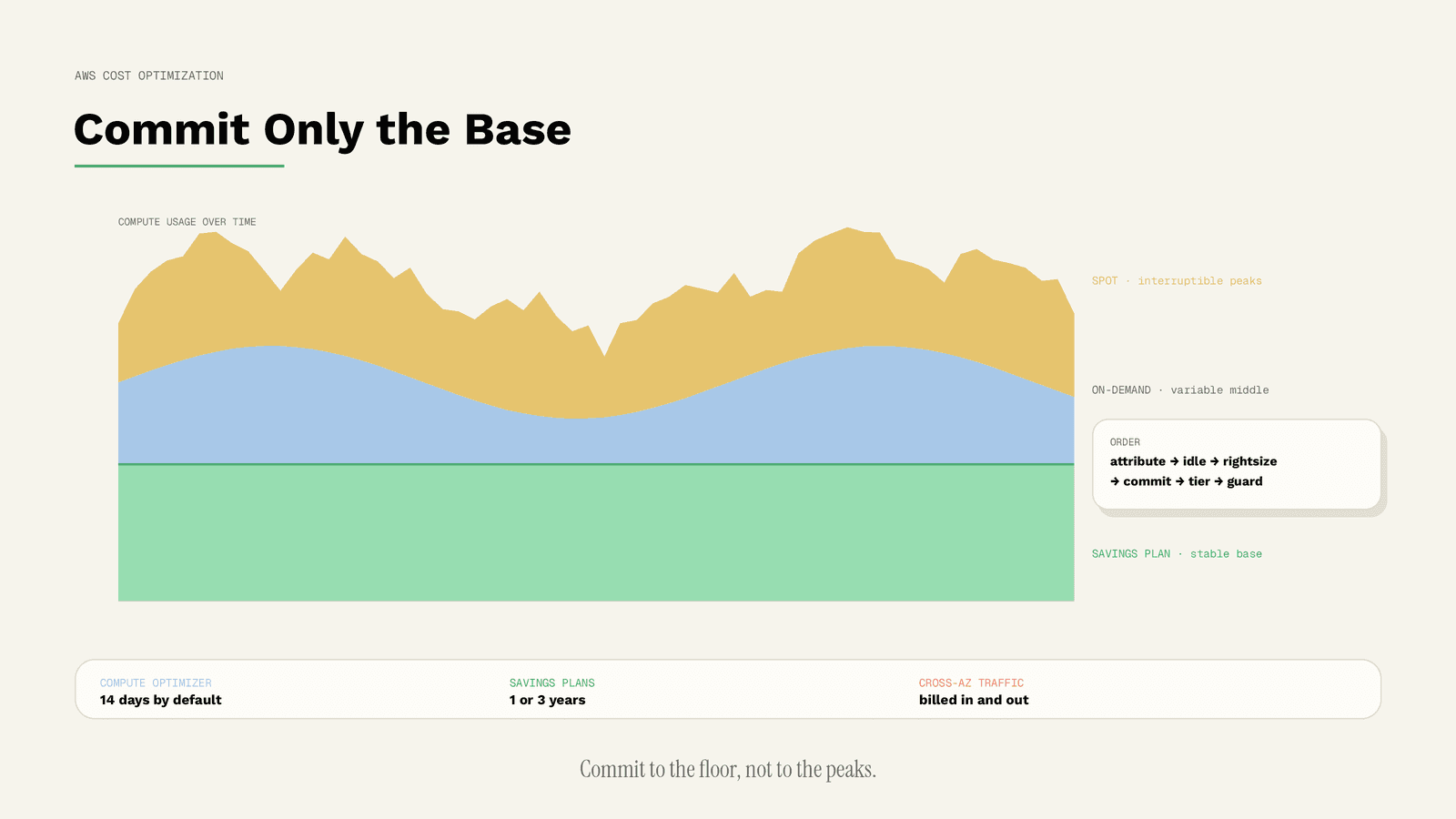
The risk is over-commitment. A Savings Plan is a promise to spend, so it should cover only the stable baseline left after Steps 2 and 3. Our article Commitment Strategy: On-Demand, Reserved, Spot explains how to size that baseline as a portfolio decision.
STEP 5: USE SPOT FOR INTERRUPTION-TOLERANT WORK
EC2 Spot Instances use spare EC2 capacity; AWS states discounts of up to 90 percent compared with on-demand prices and lists suitable uses such as big data, containerized workloads, CI/CD, high-performance computing and test environments [W3].
The trade-off is interruption. Amazon EC2 can reclaim a Spot Instance when it needs the capacity back, and it can also interrupt for host maintenance, when the Spot price exceeds your maximum price, or when group constraints can no longer be met. Interrupted instances are terminated, stopped or hibernated depending on the behaviour you chose [W5]. Spot therefore belongs to stateless and retry-tolerant workloads, not to a primary database.
STEP 6: LET STORAGE TIER ITSELF
Storage costs grow quietly because data is rarely deleted. S3 Intelligent-Tiering automatically moves objects between access tiers: to the Infrequent Access tier after 30 consecutive days without access, and to Archive Instant Access after 90 days, without performance impact. If you activate the archive options, objects can move to Archive Access after at least 90 days and Deep Archive Access after at least 180 days without access. The service charges a small monthly monitoring and automation fee per object [W6].
That fee is the reason Intelligent-Tiering suits buckets with unknown or changing access patterns, while data with a clear lifecycle is often cheaper with explicit lifecycle rules.
STEP 7: UNDERSTAND DATA TRANSFER BEFORE IT SURPRISES YOU
Data transfer is one of the least intuitive parts of an AWS bill. Within a region, data transfer between Availability Zones is charged for both inbound and outbound traffic on each metered resource. Between regions, the charge is determined by data transferred out of the source region, while data transferred into the destination region is not charged [W7]. The Cost and Usage Report labels each case with its own usage type [W7], so the first task is simply to find out which flows dominate.
Architecture changes then follow: keeping chatty services in the same Availability Zone where resilience allows, and avoiding cross-region replication that nobody needs.
STEP 8: MODERNIZE THE CHEAP WAY
Some savings require no architecture change at all. AWS states that EBS gp3 volumes offer a 20 percent lower price per GiB than gp2 volumes [W10], so migrating general-purpose volumes is usually a low-risk task. AWS also positions its Graviton processors as designed to deliver the best price performance for EC2 workloads and provides a Graviton Savings Dashboard to estimate the effect of moving workloads [W11]. Graviton requires compatible software builds, so treat it as a per-workload decision, not a blanket switch.
Networking has its own quiet cost centre: the NAT gateway. AWS charges for every hour a NAT gateway is available and for every gigabyte it processes. Its documented ways to reduce the charge are to keep resources in the same Availability Zone as the NAT gateway, or create one per zone, and to use VPC interface or gateway endpoints when most traffic goes to AWS services [W12].
For storage with a known lifecycle, S3 lifecycle rules are the explicit alternative to Intelligent-Tiering: transition actions move objects to cheaper storage classes after a set time, and expiration actions delete objects once a retention period has passed [W13].
STEP 9: PUT GUARDRAILS IN PLACE SO SAVINGS LAST
Every optimization above erodes without guardrails. AWS Budgets tracks cost and usage against targets, alerts on actual and forecast spend, monitors Savings Plans and Reserved Instance coverage, and can trigger actions such as applying a restrictive IAM policy when a threshold is reached [W8]. AWS Cost Anomaly Detection uses machine learning to detect unusual spend. It runs about three times a day on net cost data, and because it relies on Cost Explorer data, alerts can lag by up to 24 hours [W9].
That delay matters: anomaly detection catches a runaway resource within a day, not within minutes, so it complements but does not replace budgets and sensible quotas.
THE ORDER AT A GLANCE
| Step | Lever | Main risk | AWS reference |
|---|---|---|---|
| 1 | Attribution | Savings cannot be proven | Well-Architected [W1] |
| 2 | Schedules and idle resources | Stopping something still needed | [W1][W4] |
| 3 | Rightsizing | Missing seasonal peaks (14-day default) | Compute Optimizer [W4] |
| 4 | Savings Plans | Over-commitment | [W2] |
| 5 | Spot | Interruption | [W3][W5] |
| 6 | S3 Intelligent-Tiering | Monitoring fee on small objects | [W6] |
| 7 | Data transfer | Hidden cross-AZ and cross-region flows | [W7] |
| 8 | gp3, Graviton, NAT, lifecycle rules | Software compatibility (Graviton) | [W10][W11][W12][W13] |
| 9 | Budgets and anomaly detection | Alert delay up to 24 hours | [W8][W9] |
COMMON MISTAKES
Buying Savings Plans before rightsizing. The commitment outlives the oversized instances it was sized for [W2][W4].
Trusting a 14-day window for seasonal systems. The default lookback cannot see month-end or quarter-end peaks [W4].
Setting a low maximum Spot price to save more. AWS notes that specifying a maximum price makes interruptions more frequent [W5].
Ignoring transfer line items. Traffic between Availability Zones is charged for both inbound and outbound data on each metered resource, so chatty cross-AZ designs add up faster than teams expect [W7].
LIMITATIONS
This playbook is based on AWS documentation as of 15 October 2026. Discount ceilings such as "up to 72 percent" and "up to 90 percent" are AWS's own statements and represent maximums, not expected results. Real savings depend on your architecture, usage pattern and contract, and can only be calculated from your own billing data.
CONCLUSION
AWS cost optimization is less about finding a clever discount than about sequence: attribute, remove idle capacity, right-size, commit and tier, then hold the gains with guardrails. Native tools such as Compute Optimizer and Cost Explorer cover AWS well, but they only see AWS.
Atomity looks across providers. It detects idle and over-provisioned resources, compares whether a workload would run more cost-effectively on another provider such as Azure, Google Cloud or a European cloud like IONOS or STACKIT, and turns findings into draft pull requests, Jira tickets and Slack alerts so your team keeps control. To see your savings potential, start with a free cloud cost check.
SOURCES
- [W1] AWS Well-Architected Framework, Cost Optimization Pillar: Design principles. https://docs.aws.amazon.com/wellarchitected/latest/cost-optimization-pillar/design-principles.html (accessed 15 October 2026)
- [W2] AWS Documentation: What are Savings Plans? https://docs.aws.amazon.com/savingsplans/latest/userguide/what-is-savings-plans.html (accessed 15 October 2026)
- [W3] AWS: Amazon EC2 Spot Instances. https://aws.amazon.com/ec2/spot/ (accessed 15 October 2026)
- [W4] AWS Documentation: What is AWS Compute Optimizer? https://docs.aws.amazon.com/compute-optimizer/latest/ug/what-is-compute-optimizer.html (accessed 15 October 2026)
- [W5] AWS Documentation: Spot Instance interruptions. https://docs.aws.amazon.com/AWSEC2/latest/UserGuide/spot-interruptions.html (accessed 15 October 2026)
- [W6] AWS Documentation: How S3 Intelligent-Tiering works. https://docs.aws.amazon.com/AmazonS3/latest/userguide/intelligent-tiering-overview.html (accessed 15 October 2026)
- [W7] AWS Documentation: Understanding data transfer charges (AWS Cost and Usage Report). https://docs.aws.amazon.com/cur/latest/userguide/cur-data-transfers-charges.html (accessed 15 October 2026)
- [W8] AWS Documentation: Managing your costs with AWS Budgets. https://docs.aws.amazon.com/cost-management/latest/userguide/budgets-managing-costs.html (accessed 15 October 2026)
- [W9] AWS Documentation: Detecting unusual spend with AWS Cost Anomaly Detection. https://docs.aws.amazon.com/cost-management/latest/userguide/manage-ad.html (accessed 15 October 2026)
- [W10] AWS Documentation: Amazon EBS General Purpose SSD volumes. https://docs.aws.amazon.com/ebs/latest/userguide/general-purpose.html (accessed 15 October 2026)
- [W11] AWS: AWS Graviton Processors. https://aws.amazon.com/ec2/graviton/ (accessed 15 October 2026)
- [W12] AWS Documentation: Pricing for NAT gateways. https://docs.aws.amazon.com/vpc/latest/userguide/nat-gateway-pricing.html (accessed 15 October 2026)
- [W13] AWS Documentation: Managing the lifecycle of objects (S3). https://docs.aws.amazon.com/AmazonS3/latest/userguide/object-lifecycle-mgmt.html (accessed 15 October 2026)
/ GET STARTED
Make Sovereign Cloud Decisions with Confidence
Turn sovereignty requirements into enforceable cloud decisions, with continuous visibility and evidence across providers.